Build Omnichain Fungible Token (OFTs) on Rootstock with Layerzero
Rootstock supports LayerZero, a cross-chain messaging protocol. You can build omnichain applications (OApps) that send messages and tokens between Rootstock and other EVM chains. Fees, latency, and trust assumptions still depend on each route and endpoint configuration.
This tutorial shows how to implement OFT (Omnichain Fungible Token) transfers between Rootstock Testnet and Ethereum Sepolia using LayerZero OFT V2.
What you'll learn
- Set up Hardhat for cross-chain deployments
- Deploy an OFT contract for token transfers between chains
- Configure LayerZero endpoints for cross-chain communication
- Execute transfers between Rootstock and Ethereum Sepolia testnets using the crosschain transfer feature.
Prerequisites
To complete this tutorial, you'll need:
- Node.js: v18.18.0+
- RPC Providers (Rootstock, Alchemy)
- Etherscan API Key
- Sign up to get an API Key. This will be used for verifying the contracts.
- Metamask: Install and connect to Ethereum Sepolia and Rootstock Testnet
- Test Funds: Sepolia ETH and Rootstock rBTC
Important: Ensure you have sufficient test tokens on both networks.
Why teams use LayerZero on Rootstock
- Asset movement: You route value through LayerZero’s OFT and related patterns instead of ad hoc bridges. Each path still has its own fees, latency, and trust model.
- Cost and speed: Rootstock and the destination chain set gas and confirmation time. Compare endpoints before you commit user flows to a route.
- Reach: You can surface Rootstock assets on other EVM chains where your users already hold wallets and liquidity.
- Liquidity: Omnichain designs let you reference liquidity on multiple chains. Depth and slippage depend on how you split pools and incentives.
- Delivery semantics: LayerZero documents message delivery and executor behavior. Read the path config for your deployment. Do not assume “guaranteed” delivery without checking DVNs and limits.
- Composable flows: OApps can chain sends, receives, and off-chain steps. Complexity and failure modes grow with each hop, so design retries and monitoring explicitly.
Use cases for cross-chain dApps on Rootstock
LayerZero messaging supports more than simple transfers. Typical patterns include:
- Cross-chain DEX liquidity: Pool liquidity across chains. Trading rBTC and other assets still follows each pool’s rules and bridge path.
- Cross-chain lending and borrowing: Users supply or borrow on one chain while collateral or settlement lives on another. You must align liquidation, oracles, and bridge timing with your risk model.
- Omnichain governance: Votes and execution can span chains when you wire proposals to LayerZero messages. Latency and quorum rules need explicit handling per chain.
- Cross-chain yield: Vaults can rebalance across chains. Yield and principal risk depend on each venue’s contracts and the bridge path you use.
- NFTs across chains: Marketplaces can list or settle on different chains than mint. Bitcoin finality on Rootstock does not remove smart contract or bridge risk on the other side.
Getting started
Clone and cd into the Layerzero Starter Kit project, and run npm install.
git clone https://github.com/rsksmart/rsk-layerzero-xERC20.git
cd rsk-layerzero-xERC20
Set up environment variables
Rename the .env.example file to .env and update the environment variables with your own values.
MNEMONIC=
 EVM_PRIVATE_KEY=
 RPC_URL_SEPOLIA=
 RPC_URL_ROOTSTOCK_TESTNET=
 ETHERSCAN_API_KEY=
Choose either Mnemonic or the Private Key as your preferred value and set only one. Note to ensure the wallet has ETH and test rBTC. See the prerequisites section. By default, the examples support both mnemonic-based and private key-based authentication. Setup RPC url’s for Sepolia and Rootstock using Alchemy and the Rootstock RPC API. To verify the contracts from the Sepolia explorer, use the Etherscan API key. Note: Do not share these variables with third parties as you risk losing your real assets.
Configure chains
To configure the kit to deploy to your preferred chains, go to hardhat.config.ts file and replace the code below in the networks section.
Note: For better performance and reliability, use a custom RPC endpoint as suggested in the prerequisites section.
networks: {
    'sepolia-testnet': {
        eid: EndpointId.SEPOLIA_V2_TESTNET,
        url: process.env.RPC_URL_SEPOLIA || 'https://ethereum-sepolia-rpc.publicnode.com',
        accounts,
    },
    'rootstock-testnet': {
        eid: EndpointId.ROOTSTOCK_V2_TESTNET,
        url: process.env.RPC_URL_ROOTSTOCK_TESTNET || 'https://public-node.testnet.rsk.co',
        accounts,
    }
}
Deploying contracts
After adding your PRIVATE_KEY to the .env file and adding networks in your hardhat.config.ts, run the command to deploy your LayerZero contracts:
npx hardhat lz:deploy
We will specify the target chains for our OFT deployment. This action will generate a /deployments folder containing the necessary deployment assets.
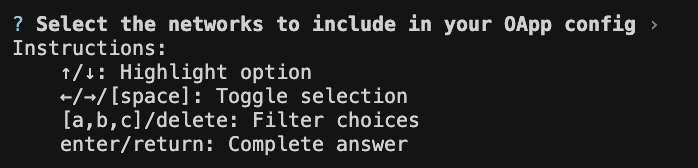
Use the default networks provided. To select other options, see the instructions above.
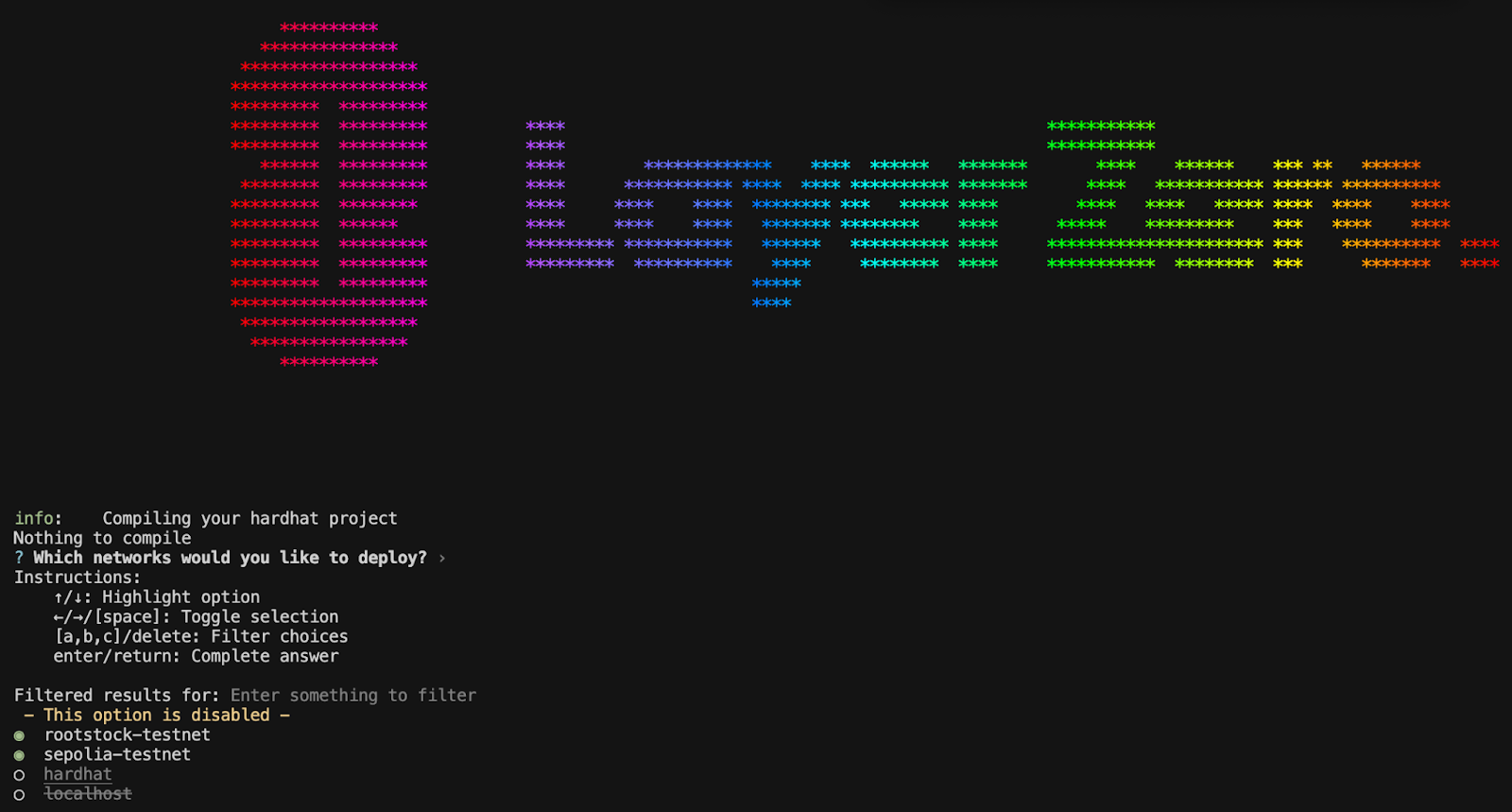
- Use the default script provided. Press Enter to proceed.

During this step, the deployer and the token contract address will be requested. Enter y to confirm.

Save the deployer address and contract address, as this will be used later in this tutorial to verify the contracts.
Verifying Contracts
You can verify your contracts by running the following command:
npx hardhat verify --network <network> <endpoint-address> <deployer address> <contract address> <constructor-arguments>
Replace <endpoint-address> with the LayerZero contract address for the respective network and <owner-address> with your deployer address saved earlier.
For example, to verify the MyOFT contract on Rootstock Testnet, you would run:
npx hardhat verify --network rootstock-testnet 0x5659E38A754C96D20fA4F08Acd9A6Cb5982149C6 "MyOFT" "MOFT" 0x6C7Ab2202C98C4227C5c46f1417D81144DA716Ff 0x5659E38A754C96D20fA4F08Acd9A6Cb5982149C6
Response:
Successfully submitted source code for contract
contracts/MyOFT.sol:MyOFT at 0xa3725eAC59776F075dC5bb02D2997a7feb326595
for verification on the block explorer. Waiting for verification result...

Successfully verified contract MyOFT on Sourcify.
https://repo.sourcify.dev/contracts/full_match/11155111/0xa3725eAC59776F075dC5bb02D2997a7feb326595/
Configuring the Omni-chain App (OApp)
LayerZero configures how contracts on different chains talk to each other. You define a pathway with send and receive libraries, verification settings (DVNs and Executors), and execution parameters such as gas and value limits. Misconfiguration can strand messages or expose funds, so treat pathway review as part of deployment, not an afterthought.
Initialize your OApp configurations by running
npx hardhat lz:oapp:config:init --contract-name MyOFT --oapp-config layerzero.config.ts
Once the command is executed, you will be prompted to select the chain set up in your layerzero.config.ts file.
Each section contains a config, containing multiple configuration structs for changing how your OApp sends and receives messages, specifically for the chain your OApp is sending from:
Wiring the OApp
Before initiating token transfers between chains, it's crucial to configure your LayerZero contracts for each unique pathway. Note that LayerZero contracts require distinct configurations for each direction. For example, transferring from Rootstock Testnet to Sepolia involves different settings than transferring from Sepolia to Rootstock Testnet.
For a comprehensive list of available configuration commands, refer to the LayerZero Configuring Contracts documentation.
npx hardhat lz:oapp:wire --oapp-config layerzero.config.ts
This command sets up the necessary connections between your deployed contracts on different chains.
Response:
info:    [OApp] ✓ Checked OApp delegates
info:    [OApp] ✓ Checked OApp configuration
info:    There are 10 transactions required to configure the OApp
Review the contract:
 Endpoint            ROOTSTOCK_V2_TESTNET                                                                                                                                                        │
│ OmniAddress         0x5659E38A754C96D20fA4F08Acd9A6Cb5982149C6                                                                                                                                  │
│ OmniContract        -                                                                                                                                                                           │
│ Function Name       -                                                                                                                                                                           │
│ Function Arguments  -                                                                                                                                                                           │
│ Description         Setting peer for eid 40161 (SEPOLIA_V2_TESTNET) to address 0x000000000000000000000000a3725eac59776f075dc5bb02d2997a7feb326595                                               │
│ Data                0x3400288b0000000000000000000000000000000000000000000000000000000000009ce1000000000000000000000000a3725eac59776f075dc5bb02d2997a7feb326595                                  │
│ Value               -                                                                                                                                                                           │
│ Gas Limit           -                                                                                                                                                                           │
└─────────────────────────────────────────────────────────────────────────────────────────────────────────────────────────────────────────────────────────────────────────────────────────────────┘
┌─────────────────────────────────────────────────────────────────────────────────────────────────────────────────────────────────────────────────────────────────────────────────────────────────┐
│ Endpoint            SEPOLIA_V2_TESTNET                                                                                                                                                          │
│ OmniAddress         0xa3725eAC59776F075dC5bb02D2997a7feb326595                                                                                                                                  │
│ OmniContract        -                                                                                                                                                                           │
│ Function Name       -                                                                                                                                                                           │
│ Function Arguments  -                                                                                                                                                                           │
│ Description         Setting peer for eid 40350 (ROOTSTOCK_V2_TESTNET) to address 0x0000000000000000000000005659e38a754c96d20fa4f08acd9a6cb5982149c6                                             │
...
When wiring finishes, the contracts can move tokens between chains according to the OFT logic and limits you set.
Functions
Mint: A task was created by extending the Hardhat configuration to enable developers to mint Omnichain Fungible Tokens (OFTs) directly from the command line.
 /// @notice Mint new tokens. Only the owner can call this.
    function mint(address _to, uint256 _amount) public virtual onlyOwner {
        _mint(_to, _amount);
    }
This command mints a specific --amount of OFT tokens by interacting with a deployed contract (--contract) on the configured --network. The transaction is signed using the --private-key, which authenticates the caller as an authorized caller (Deployer in this case).
npx hardhat lz:oft:mint \
  --contract 0xYourContractAddress \
  --network rootstock-testnet \
  --amount 10 \
  --private-key $PRIVATE_KEY
Response:
Network: rootstock-testnet
Wallet address: 0xA0365b08A56c75701415610Bf49B30DbfA285ac4
Recipient: 0xA0365b08A56c75701415610Bf49B30DbfA285ac4
Minting 10 tokens to 0xA0365b08A56c75701415610Bf49B30DbfA285ac4
Transaction hash: 0xf07041ec4af76d0a0f02ab54320595602f6ff3d78db4dc45438c7a434fd9cb32
Transaction confirmed in block 6406847
Successfully minted 10 tokens to 0xA0365b08A56c75701415610Bf49B30DbfA285ac4
Send: Thelz:oft:sendcommand is a custom Hardhat task that makes it easy to send tokens across blockchains using LayerZero’s Omnichain Fungible Token (OFT) standard.
It’s not a built-in Hardhat feature; it's added when a project is scaffolded using LayerZero’s development tools. Under the hood, this task interacts with a deployed OFT smart contract to transfer tokens from one blockchain (like Ethereum Sepolia) to another (like Rootstock).
npx hardhat lz:oft:send \
--contract 0x5659E38A754C96D20fA4F08Acd9A6Cb5982149C6 \
--recipient 0xA0365b08A56c75701415610Bf49B30DbfA285ac4 \
--source rootstock-testnet \
--destination sepolia-testnet \
--amount 1 \
--privatekey $PRIVATE_KEY
Where;
--contract: Deployed contract address on Rootstock Testnet--recipient: Deployer address on Rootstock Testnet and Sepolia Testnet.--source: Source network--destination: Destination network to send--amount: Amount to send--privatekey: Wallet private key
Response:
Source Network: rootstock-testnet (EID: 40350)
Destination Network: sepolia-testnet (EID: 40161)
Contract: 0x5659E38A754C96D20fA4F08Acd9A6Cb5982149C6
Recipient: 0xA0365b08A56c75701415610Bf49B30DbfA285ac4
Sender address: 0xA0365b08A56c75701415610Bf49B30DbfA285ac4
Amount to send: 1 tokens
Estimating fees...
Estimated fee: 0.000002132285111065 native tokens
Using fee with buffer: 0.00000426457022213 native tokens
Current gas price: 0.035000001 gwei

Sending 1 token(s) from rootstock-testnet to sepolia-testnet...
Transaction hash: 0xe77899b28a43345fae8006ee5ee86210fedc890076cc934302f36b7db7d99345
Waiting for transaction confirmation...
Transaction confirmed in block 6406912

Tokens sent successfully! View on [LayerZero Scan](https://testnet.layerzeroscan.com/tx/0xe77899b28a43345fae8006ee5ee86210fedc890076cc934302f36b7db7d99345)
After execution, the CLI prints a link such as LayerZero Scan for that transaction. Mainnet runs can take longer than testnet because of gas markets, executor load, and chain conditions.
To monitor your cross-chain transactions:
- LayerZero Scan - Official LayerZero explorer
- Rootstock Explorer - For Rootstock testnet transactions
- Sepolia Etherscan - For Ethereum Sepolia transactions
Troubleshooting
Encountered issues?
- Ensure you have sufficient test tokens on both networks
- Verify your RPC endpoints are working correctly
- Check that your contracts are properly configured for cross-chain messaging
- Examine transaction logs for specific error messages