This guide walks you through building a React dApp that integrates with the **Rootstock Name Service (RNS)** using the `@rsksmart/rns-sdk`. You'll create a functional application that allows users to:
- Resolve domain names to addresses
- Check domain availability
- Check subdomain availability
- Get domain owner information
- Get resolver contract addresses
By the end of this guide, you'll have a working dApp that demonstrates core RNS operations using the official SDK.
## Prerequisites
Before starting, ensure you have the following:
- [Node.js](https://nodejs.org/en/download) and [npm](https://docs.npmjs.com/downloading-and-installing-node-js-and-npm/) installed
- Basic understanding of React and JavaScript
- Familiarity with blockchain concepts
:::note
All code snippets in this guide will be added inside your `App.js` file.
:::
## 1. Project Setup
a. Create a new React app and navigate to the project directory:
```bash
npx create-react-app rns-dapp
cd rns-dapp
```
b. Install the required dependencies:
```bash
npm install @rsksmart/rns-sdk @ethersproject/providers ethers react-dom react-scripts
npm install -D buffer
```
After installation, your `package.json` should include these dependencies (versions may vary based on the latest releases):
```json
{
"dependencies": {
"@rsksmart/rns-sdk": "^1.0.0",
"@ethersproject/providers": "^5.7.2",
"ethers": "^5.7.2",
"react": "^18.2.0",
"react-dom": "^18.2.0",
"react-scripts": "^5.0.1"
}
},
"devDependencies": {
"buffer": "^6.0.3"
},
```
c. Go to `index.js` and change it to the following code:
```js
import './index.css';
// Polyfill Buffer for browser environment
window.Buffer = window.Buffer || require('buffer').Buffer;
const root = createRoot(document.getElementById('root'));
root.render();
```
## 2. Import Required Modules
Open your `App.js` file and add the following imports:
```js
```
**What each import does:**
| Import | Purpose |
|--------|---------|
| `React, useState, useCallback, useMemo` | React hooks for state management |
| `JsonRpcProvider` | Connect to RSK network via RPC |
| `RNS` | Domain management (owner, resolver, subdomains) |
| `AddrResolver` | Resolve domains to addresses |
| `RSKRegistrar` | Check domain availability |
## 3. Configure Network and Contract Addresses
Add the configuration for connecting to Rootstock Testnet:
```js
const ROOTSTOCK_RPC_NODE = 'https://rpc.testnet.rootstock.io/${APIKEY}';
// Contract addresses for Rootstock Testnet
// See: https://github.com/rsksmart/rns-sdk
const ADDRESSES = {
// RNS Registry (testnet)
registry: "0x7d284aaac6e925aad802a53c0c69efe3764597b8",
// RSK Owner - ERC-721 .rsk domains token (testnet)
rskOwner: "0xca0a477e19bac7e0e172ccfd2e3c28a7200bdb71",
// FIFS Addr Registrar - .rsk domains registrar (testnet)
fifsAddrRegistrar: "0x90734bd6bf96250a7b262e2bc34284b0d47c1e8d",
// RIF Token (testnet)
rifToken: "0x19f64674d8a5b4e652319f5e239efd3bc969a1fe",
};
```
For Mainnet, use the following addresses instead:
| Contract | Mainnet Address |
| ---------- | --------------- |
| Registry | 0xcb868aeabd31e2b66f74e9a55cf064abb31a4ad5 |
| RSK Owner | 0x45d3e4fb311982a06ba52359d44cb4f5980e0ef1 |
| FIFS Addr Registrar | 0xd9c79ced86ecf49f5e4a973594634c83197c35ab |
| RIF Token | 0x2acc95758f8b5f583470ba265eb685a8f45fc9d5 |
## 4. Initialize the Provider
Create a JSON-RPC provider to connect to the Rootstock network:
```js
const provider = new JsonRpcProvider(ROOTSTOCK_RPC_NODE);
```
## 5. Add UI Styles
Add styling for the application interface:
```js
const styles = {
container: {
minHeight: "100vh",
backgroundColor: "#f5f6fa",
display: "flex",
justifyContent: "center",
alignItems: "center",
padding: "20px",
fontFamily: "Arial, sans-serif",
},
card: {
backgroundColor: "#fff",
padding: "25px",
borderRadius: "10px",
maxWidth: "520px",
width: "100%",
boxShadow: "0 2px 6px rgba(0,0,0,0.1)",
},
heading: {
textAlign: "center",
marginBottom: "20px",
fontSize: "22px",
},
input: {
padding: "10px",
width: "100%",
borderRadius: "6px",
border: "1px solid #ccc",
marginBottom: "10px",
boxSizing: "border-box",
},
buttonGroup: {
display: "flex",
gap: "10px",
marginBottom: "10px",
},
button: {
flex: 1,
padding: "10px",
backgroundColor: "#388e3c",
color: "#fff",
border: "none",
borderRadius: "6px",
cursor: "pointer",
},
buttonAlt: {
flex: 1,
padding: "10px",
backgroundColor: "#1976d2",
color: "#fff",
border: "none",
borderRadius: "6px",
cursor: "pointer",
},
buttonWide: {
width: "100%",
padding: "10px",
backgroundColor: "#5e35b1",
color: "#fff",
border: "none",
borderRadius: "6px",
marginTop: "10px",
marginBottom: "5px",
cursor: "pointer",
},
ownerBox: {
padding: "10px",
backgroundColor: "#e8f5e9",
borderRadius: "6px",
border: "1px solid #c8e6c9",
marginTop: "10px",
},
divider: {
margin: "20px 0",
borderTop: "1px solid #ddd",
},
resultBox: {
marginTop: "10px",
padding: "10px",
backgroundColor: "#f9f9f9",
border: "1px solid #ddd",
borderRadius: "6px",
},
};
```
## 6. Create the RNS Custom Hook
The custom hook `useRns` encapsulates all RNS SDK operations:
```js
const useRns = () => {
// Initialize SDK instances
// For read-only operations, we pass the provider
// For write operations, you'd need a proper Signer
const rns = useMemo(() => new RNS(ADDRESSES.registry, provider), []);
const addrResolver = useMemo(
() => new AddrResolver(ADDRESSES.registry, provider),
[]
);
const rskRegistrar = useMemo(
() =>
new RSKRegistrar(
ADDRESSES.rskOwner,
ADDRESSES.fifsAddrRegistrar,
ADDRESSES.rifToken,
provider
),
[]
);
```
### a. Get RSK address Using `AddrResolver` for a domain
```js
const getAddressByRns = useCallback(
async (domain) => {
try {
const address = await addrResolver.addr(domain);
if (
!address ||
address === "0x0000000000000000000000000000000000000000"
) {
return null;
}
return address.toLowerCase();
} catch (e) {
console.error("getAddressByRns error:", e);
return null;
}
},
[addrResolver]
);
```
### b. Get a domain resolver contract address
```js
const getResolverAddress = useCallback(
async (domain) => {
try {
const resolverAddr = await rns.getResolver(domain);
return resolverAddr;
} catch (e) {
console.error("getResolverAddress error:", e);
return null;
}
},
[rns]
);
```
### c. Get the domain's owner
```js
const getOwner = useCallback(
async (domain) => {
try {
const owner = await rns.getOwner(domain);
if (!owner || owner === "0x0000000000000000000000000000000000000000") {
return null;
}
return owner.toLowerCase();
} catch (e) {
console.error("getOwner error:", e);
return null;
}
},
[rns]
);
```
### d. Check if a `.rsk` domain is available for registration
```js
const checkAvailability = useCallback(
async (domain) => {
try {
// Extract the label from the domain (remove .rsk suffix)
const label = domain.replace(/\.rsk$/i, "");
const available = await rskRegistrar.available(label);
return available;
} catch (e) {
console.error("checkAvailability error:", e);
return false;
}
},
[rskRegistrar]
);
```
### e. Check if a subdomain is available
```js
const checkSubdomain = useCallback(
async (domain, subdomain) => {
try {
const available = await rns.getSubdomainAvailability(domain, subdomain);
return available;
} catch (e) {
console.error("checkSubdomain error:", e);
return false;
}
},
[rns]
);
```
### f. Return the hook's public API
```js
return useMemo(
() => ({
getAddressByRns,
getResolverAddress,
getOwner,
checkAvailability,
checkSubdomain,
// Expose SDK instances for advanced usage
rns,
addrResolver,
rskRegistrar,
}),
[
getAddressByRns,
getResolverAddress,
getOwner,
checkAvailability,
checkSubdomain,
rns,
addrResolver,
rskRegistrar,
]
);
};
```
## 7. Create the Main Component
Add the main App component with the user interface:
```js
// ============================================================================
// MAIN COMPONENT
// ============================================================================
export default function App() {
const {
getAddressByRns,
getResolverAddress,
getOwner,
checkAvailability,
checkSubdomain,
} = useRns();
const [domain, setDomain] = useState("");
const [subdomain, setSubdomain] = useState("");
const [result, setResult] = useState("");
const [owner, setOwner] = useState("");
const [loading, setLoading] = useState(false);
const wrap = async (fn) => {
setLoading(true);
setResult("");
setOwner("");
try {
await fn();
} finally {
setLoading(false);
}
};
return (
Rootstock Name Service Lookup
setDomain(e.target.value)}
placeholder="Enter domain like testing.rsk"
/>
wrap(async () => {
const addr = await getAddressByRns(domain);
setResult(addr || "No RSK address found");
})
}
>
Resolve RSK
wrap(async () => {
const addr = await getResolverAddress(domain);
setResult(addr || "No resolver found");
})
}
>
Get Resolver
wrap(async () => {
const available = await checkAvailability(domain);
setResult(
available ? "✅ Domain is available" : "❌ Domain is taken"
);
})
}
>
Check Availability
setSubdomain(e.target.value)}
placeholder="Enter subdomain"
/>
wrap(async () => {
const available = await checkSubdomain(domain, subdomain);
setResult(
available
? "✅ Subdomain is available"
: "❌ Subdomain is taken"
);
})
}
>
Check Subdomain
wrap(async () => {
const ownerAddr = await getOwner(domain);
if (ownerAddr) {
setOwner(ownerAddr);
setResult("Owner found");
} else {
setResult("No owner found");
}
})
}
>
Get Owner
{owner && (
Owner: {owner}
)}
{loading ? "Loading..." : result}
);
}
```
## 8. Complete App.js Code
Here's the complete `App.js` file with all the code combined:
### Click to expand full App.js code
```js
// ============================================================================
// CONFIGURATION
// ============================================================================
const ROOTSTOCK_RPC_NODE = "https://public-node.testnet.rsk.co";
// Contract addresses for RSK Testnet
const ADDRESSES = {
registry: "0x7d284aaac6e925aad802a53c0c69efe3764597b8",
rskOwner: "0xca0a477e19bac7e0e172ccfd2e3c28a7200bdb71",
fifsAddrRegistrar: "0x90734bd6bf96250a7b262e2bc34284b0d47c1e8d",
rifToken: "0x19f64674d8a5b4e652319f5e239efd3bc969a1fe",
};
// ============================================================================
// PROVIDER SETUP
// ============================================================================
const provider = new JsonRpcProvider(ROOTSTOCK_RPC_NODE);
// ============================================================================
// STYLES
// ============================================================================
const styles = {
container: {
minHeight: "100vh",
backgroundColor: "#f5f6fa",
display: "flex",
justifyContent: "center",
alignItems: "center",
padding: "20px",
fontFamily: "Arial, sans-serif",
},
card: {
backgroundColor: "#fff",
padding: "25px",
borderRadius: "10px",
maxWidth: "520px",
width: "100%",
boxShadow: "0 2px 6px rgba(0,0,0,0.1)",
},
heading: {
textAlign: "center",
marginBottom: "20px",
fontSize: "22px",
},
input: {
padding: "10px",
width: "100%",
borderRadius: "6px",
border: "1px solid #ccc",
marginBottom: "10px",
boxSizing: "border-box",
},
buttonGroup: {
display: "flex",
gap: "10px",
marginBottom: "10px",
},
button: {
flex: 1,
padding: "10px",
backgroundColor: "#388e3c",
color: "#fff",
border: "none",
borderRadius: "6px",
cursor: "pointer",
},
buttonAlt: {
flex: 1,
padding: "10px",
backgroundColor: "#1976d2",
color: "#fff",
border: "none",
borderRadius: "6px",
cursor: "pointer",
},
buttonWide: {
width: "100%",
padding: "10px",
backgroundColor: "#5e35b1",
color: "#fff",
border: "none",
borderRadius: "6px",
marginTop: "10px",
marginBottom: "5px",
cursor: "pointer",
},
ownerBox: {
padding: "10px",
backgroundColor: "#e8f5e9",
borderRadius: "6px",
border: "1px solid #c8e6c9",
marginTop: "10px",
},
divider: {
margin: "20px 0",
borderTop: "1px solid #ddd",
},
resultBox: {
marginTop: "10px",
padding: "10px",
backgroundColor: "#f9f9f9",
border: "1px solid #ddd",
borderRadius: "6px",
},
};
// ============================================================================
// RNS HOOK - Using @rsksmart/rns-sdk
// ============================================================================
const useRns = () => {
const rns = useMemo(() => new RNS(ADDRESSES.registry, provider), []);
const addrResolver = useMemo(
() => new AddrResolver(ADDRESSES.registry, provider),
[]
);
const rskRegistrar = useMemo(
() =>
new RSKRegistrar(
ADDRESSES.rskOwner,
ADDRESSES.fifsAddrRegistrar,
ADDRESSES.rifToken,
provider
),
[]
);
const getAddressByRns = useCallback(
async (domain) => {
try {
const address = await addrResolver.addr(domain);
if (
!address ||
address === "0x0000000000000000000000000000000000000000"
) {
return null;
}
return address.toLowerCase();
} catch (e) {
console.error("getAddressByRns error:", e);
return null;
}
},
[addrResolver]
);
const getResolverAddress = useCallback(
async (domain) => {
try {
const resolverAddr = await rns.getResolver(domain);
return resolverAddr;
} catch (e) {
console.error("getResolverAddress error:", e);
return null;
}
},
[rns]
);
const getOwner = useCallback(
async (domain) => {
try {
const owner = await rns.getOwner(domain);
if (!owner || owner === "0x0000000000000000000000000000000000000000") {
return null;
}
return owner.toLowerCase();
} catch (e) {
console.error("getOwner error:", e);
return null;
}
},
[rns]
);
const checkAvailability = useCallback(
async (domain) => {
try {
const label = domain.replace(/\.rsk$/i, "");
const available = await rskRegistrar.available(label);
return available;
} catch (e) {
console.error("checkAvailability error:", e);
return false;
}
},
[rskRegistrar]
);
const checkSubdomain = useCallback(
async (domain, subdomain) => {
try {
const available = await rns.getSubdomainAvailability(domain, subdomain);
return available;
} catch (e) {
console.error("checkSubdomain error:", e);
return false;
}
},
[rns]
);
return useMemo(
() => ({
getAddressByRns,
getResolverAddress,
getOwner,
checkAvailability,
checkSubdomain,
rns,
addrResolver,
rskRegistrar,
}),
[
getAddressByRns,
getResolverAddress,
getOwner,
checkAvailability,
checkSubdomain,
rns,
addrResolver,
rskRegistrar,
]
);
};
// ============================================================================
// MAIN COMPONENT
// ============================================================================
export default function App() {
const {
getAddressByRns,
getResolverAddress,
getOwner,
checkAvailability,
checkSubdomain,
} = useRns();
const [domain, setDomain] = useState("");
const [subdomain, setSubdomain] = useState("");
const [result, setResult] = useState("");
const [owner, setOwner] = useState("");
const [loading, setLoading] = useState(false);
const wrap = async (fn) => {
setLoading(true);
setResult("");
setOwner("");
try {
await fn();
} finally {
setLoading(false);
}
};
return (
Rootstock Name Service Lookup
setDomain(e.target.value)}
placeholder="Enter domain like testing.rsk"
/>
wrap(async () => {
const addr = await getAddressByRns(domain);
setResult(addr || "No RSK address found");
})
}
>
Resolve RSK
wrap(async () => {
const addr = await getResolverAddress(domain);
setResult(addr || "No resolver found");
})
}
>
Get Resolver
wrap(async () => {
const available = await checkAvailability(domain);
setResult(
available ? "✅ Domain is available" : "❌ Domain is taken"
);
})
}
>
Check Availability
setSubdomain(e.target.value)}
placeholder="Enter subdomain"
/>
wrap(async () => {
const available = await checkSubdomain(domain, subdomain);
setResult(
available
? "✅ Subdomain is available"
: "❌ Subdomain is taken"
);
})
}
>
Check Subdomain
wrap(async () => {
const ownerAddr = await getOwner(domain);
if (ownerAddr) {
setOwner(ownerAddr);
setResult("Owner found");
} else {
setResult("No owner found");
}
})
}
>
Get Owner
{owner && (
Owner: {owner}
)}
{loading ? "Loading..." : result}
);
}
```
## 9. Run the Application
Start the development server:
```bash
npm start
```
Your application should now be running at:
```bash
http://localhost:3000.
```
This is how your UI should look:
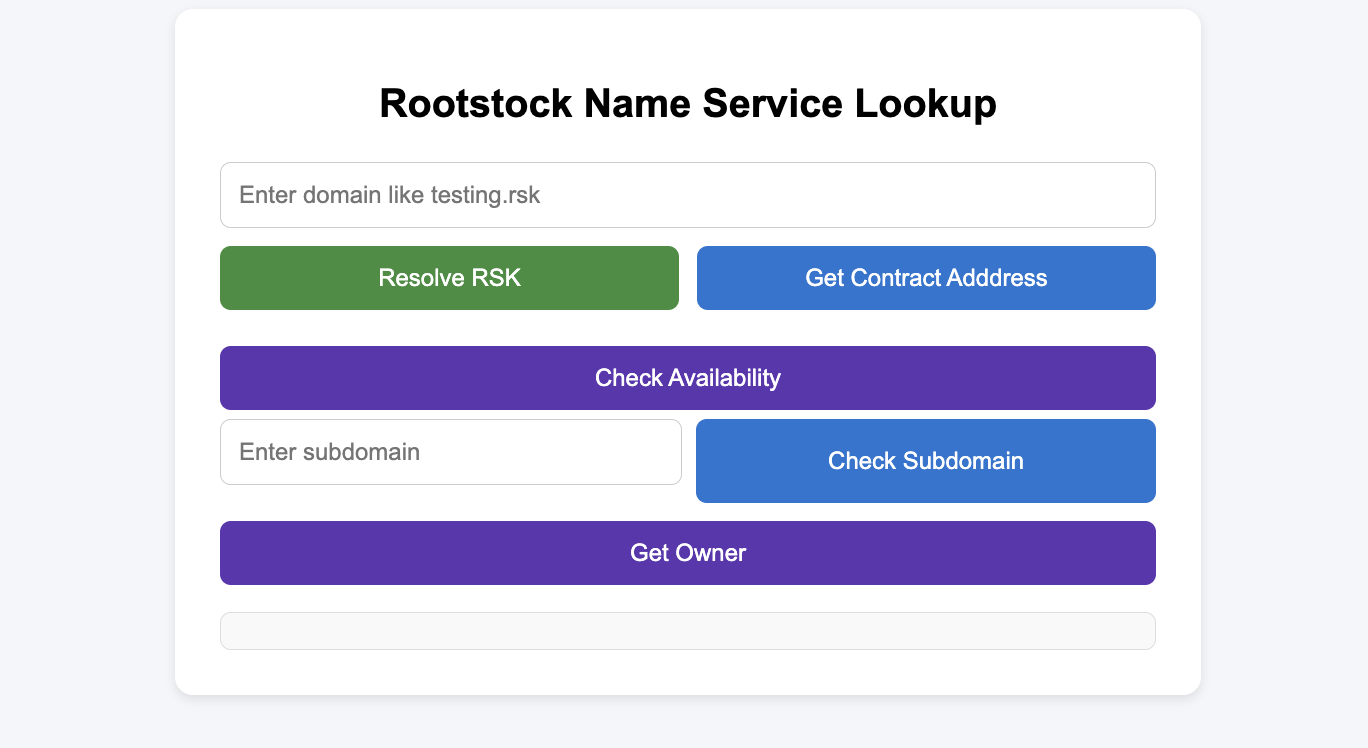
It should also function properly, as shown in the demo below:
Video demonstration: /video/rns-dapp-demo.mp4
## Troubleshooting
if you experience buffer error like this in your browser:
```bash
getAddressByRns error: ReferenceError: Buffer is not defined
at hash (bundle.js:2:1)
at e.hashDomain (bundle.js:2:1)
at t. (bundle.js:2:1)
at bundle.js:2:1
at Object.next (bundle.js:2:1)
at bundle.js:2:1
at new Promise ()
at n (bundle.js:2:1)
at t.addr (bundle.js:2:1)
at App.js:177:1
```
This mean the library uses a dependency that requires Buffer to be available globally. If you are using in a browser environment, you need to the following:
1. Install the dependency:
```bash
npm install -D buffer
```
2. If you have a `webpack.config.js` file in your project root, add this configuration to it:
```js
const webpackConfig = {
resolve: {
fallback: {
buffer: require.resolve('buffer/'),
},
},
plugins: [
new webpack.ProvidePlugin({
Buffer: ['buffer', 'Buffer'],
}),
],
};
```
OR add this to your `index.js` file
```js
window.Buffer = window.Buffer || require('buffer/').Buffer;
```
OR if you're using Next.js, add it to `next.config.js`:
```js
module.exports = {
webpack: (config) => {
config.resolve.fallback = { buffer: require.resolve('buffer/') };
return config;
},
};
```
## Extending the dApp
### Adding Write Operations
To enable write operations (registering domains, setting addresses), you'll need to:
1. Connect a wallet (MetaMask)
2. Use a Signer instead of Provider
```js
// Connect wallet
const web3Provider = new ethers.providers.Web3Provider(window.ethereum);
await web3Provider.send("eth_requestAccounts", []);
const signer = web3Provider.getSigner();
// Initialize SDK with signer for write operations
const rns = new RNS(ADDRESSES.registry, signer);
const addrResolver = new AddrResolver(ADDRESSES.registry, signer);
```
### Adding Domain Registration
See the [RNS SDK documentation](/developers/integrate/rns/js-sdk/) for complete examples of domain registration using `RSKRegistrar.commitToRegister()` and `RSKRegistrar.register()`.
## Conclusion
You've built a functional RNS lookup dApp using `@rsksmart/rns-sdk`. This demonstrates:
- Initializing SDK classes (`RNS`, `AddrResolver`, `RSKRegistrar`)
- Creating a custom React hook for RNS operations
- Resolving domains to addresses
- Checking domain and subdomain availability
- Querying domain ownership and resolver information
## Resources
- [RNS SDK GitHub Repository](https://github.com/rsksmart/rns-sdk)
- [RNS SDK Documentation](/developers/integrate/rns/js-sdk/)
- [RNS Registry Testnet](https://explorer.testnet.rootstock.io/address/0x7d284aaac6e925aad802a53c0c69efe3764597b8)
- [RNS Registry Mainnet](https://explorer.rootstock.io/address/0xcb868aeabd31e2b66f74e9a55cf064abb31a4ad5)
- [Rootstock Testnet Faucet](https://faucet.rootstock.io/)